
Electronic invoicing has long been mandatory in business transactions with public-sector contracting authorities. As early as 2020, companies have been required to send e-invoices to authorities rather than in paper form or as a PDF. Comparable requirements also apply at the state and municipal level.
Looking ahead, the topic is becoming even more important. Under the Growth Opportunities Act (Wachstumschancengesetz), e-invoicing will also become mandatory in the B2B sector. Starting in 2025, every business must be able to receive invoices, and by no later than 2028, also be able to send them. (Wachstumschancengesetz, § 27 para. 38 UStG).
For businesses, this means there is no way around switching to e-invoicing anymore, even if they currently do not issue any invoices to authorities.
Which e-invoice format for authorities?
According to EU Directive 2014/55/EU, an e-invoice is a structured invoice in XML format that can be processed electronically and automatically read by machines. A PDF document without an XML file will no longer be considered an e-invoice in the future.
The following formats are used in Germany:
- XRechnung
- XRechnung has been the mandatory federal standard since 2020, i.e., for authorities and other government organizations. It is an XML-based data format that is fully structured and can be processed automatically.
- ZUGFeRD (Hybrid-Format)
- ZUGFeRD (short for: Zentraler User Guide des Forums elektronische Rechnung Deutschland) consists of a human-readable PDF and an integrated XML file for machines. As of version 2.1.1, ZUGFeRD is permitted for authorities provided it complies with the ‘EN 16931’ profile.
For invoices to federal public-sector contracting authorities, XRechnung is the mandatory standard. It fully meets the requirements of the European standard EN 16931 and the E-Invoicing Ordinance (ERechV).
ZUGFeRD from version 2.1.1 is also theoretically accepted by authorities if it meets the requirements of EN 16931. However, not every public-sector contracting authority accepts ZUGFeRD.
In practice, this means: If you want to be on the safe side, you should always use XRechnung. Your contracting authority will be happy to tell you which format it expects. You can then save the preferred format in an invoicing program of your choice.
There is an exception at the federal level for direct awards with a contract value of less than EUR 1,000 net. In these cases, no electronic invoice is required, but it is still recommended (§ 3 para. 3 ERechV). Different rules may apply for states and municipalities.
Practical tip: Creating e-invoices to authorities with software
With specialized e-invoicing software such as easybill, the process can be significantly simplified and implemented in a legally compliant manner.
First, as usual, you create a new invoice and enter all relevant customer data. It is important that you also correctly enter the public-sector contracting authority’s Leitweg-ID. In easybill, this is maintained in the corresponding e-invoicing fields.
You then select the appropriate format. For authorities, XRechnung is recommended because it is accepted by all platforms. easybill automatically ensures the correct structuring of the data in accordance with the legal requirements.
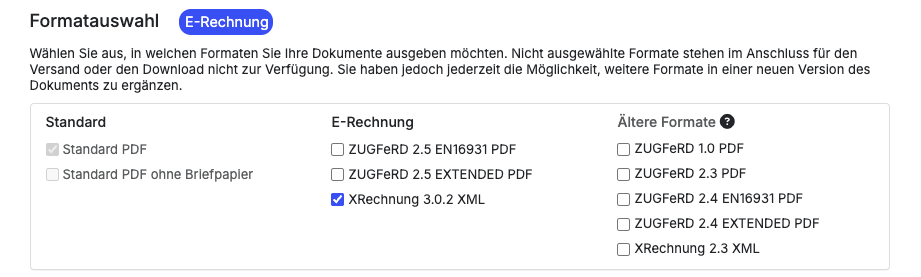
You can add all required mandatory details such as bank details, payment terms, and order references directly in the invoice. The software checks in the background whether all necessary fields have been filled in.
Once completed, you can easily export the invoice as an XRechnung file or transmit it directly via the intended transfer route, such as a portal or a Peppol interface.
For you, this means you continue working in your familiar interface while the technical requirements for e-invoicing are automatically met in the background.
The checklist: What you need for sending
Checklist: 3 requirements for a valid e-invoice to authorities.
- Leitweg-ID: Your digital address within the public administration.
- Mandatory details: Additional fields such as purchase order numbers.
- Format: XRechnung or compliant ZUGFeRD.
Leitweg-ID
The Leitweg-ID is a key mandatory detail. It works like a unique address within the public administration and ensures that the invoice is delivered correctly.
You receive the Leitweg-ID directly from the contracting authority, usually automatically when the order is placed or upon request.
Mandatory details
In addition to the standard invoice components required under the German VAT Act (Umsatzsteuergesetz), additional details are required. These include, in particular:
- Leitweg-ID of the contracting authority
- Your bank details
- Payment terms
- Email address
- References such as order number or contract reference
Incomplete information often leads to invoices being automatically rejected.
Retention obligations
Important retention rules under the GoBD: e-invoices must be archived in an audit-proof manner for 8 years. This means the original XML format must be stored in an unalterable form. Simply printing the invoice is not legally sufficient. The retention period is generally eight years (UStG Section 14b). Modern e-invoicing software such as easybill already includes legally compliant cloud archiving.
In practice: Transmission channels for e-invoices to public authorities
You have several options for sending them. Which option makes sense depends heavily on your day-to-day work.
Portal solution
Using web portals, you can manually enter or upload invoices. This solution is particularly suitable if you only issue invoices to public authorities occasionally.
Software solution
Modern invoicing programs such as easybill automatically create e-invoices in the correct format. They are sent directly from the system or via an interface to the relevant portal. This saves time and reduces errors.
Peppol network
What is the Peppol network? Peppol is an international transmission channel that functions like a secure postal network for e-invoices. Instead of manual uploads to portals, invoices are sent directly from the software to the public authority. For businesses that send invoices regularly, this is a particularly efficient solution.
Overview: Submitting an e-invoice to public authorities
The right platform always depends on the client.
Federal government
Two central systems are available for federal authorities:
- Zentrale Rechnungseingangsplattform (ZRE)
- OZG-compliant invoice receipt platform (OZG-RE)
Which platform is used is specified by the client.
Federal states and municipalities
The federal states operate their own portals or use shared solutions. The requirements may differ in detail, for example regarding formats or transmission channels.
| Federal state | Platform |
| Baden-Württemberg | Zentrale Rechnungseingangsplattform Baden-Württemberg (ZRE BW) |
| Bayern | BayernPortal / BayRMS |
| Berlin | Zentrale E-Rechnungsplattform Berlin |
| Brandenburg | Zentrale Rechnungseingangsplattform Brandenburg |
| Bremen | Rechnungseingangsplattform Bremen |
| Hamburg | Zentrale Rechnungseingangsplattform Hamburg |
| Hessen | Zentrale Rechnungseingangsplattform Hessen |
| Mecklenburg-Vorpommern | Zentrale Rechnungseingangsplattform Mecklenburg-Vorpommern |
| Niedersachsen | Niedersächsische Rechnungseingangsplattform |
| Nordrhein-Westfalen | Rechnungseingangsplattform NRW |
| Rheinland-Pfalz | Zentrale Rechnungseingangsplattform Rheinland-Pfalz |
| Saarland | Zentrale Rechnungseingangsplattform Saarland |
| Sachsen | Zentrale Rechnungseingangsplattform Sachsen |
| Sachsen-Anhalt | Zentrale Rechnungseingangsplattform Sachsen-Anhalt |
| Schleswig-Holstein | Zentrale Rechnungseingangsplattform Schleswig-Holstein |
| Thüringen | Zentrale Rechnungseingangsplattform Thüringen |
For invoices to municipalities, there is no uniform nationwide platform. The only decisive factor is the specification of the respective city, municipality, or municipal enterprise. The required submission method is bindingly derived from the Leitweg-ID and the tender documents. Without this specification, correct delivery is not possible.
Practical tip
Clarify which platform must be used before issuing the invoice. This information is binding and saves you unnecessary follow-up questions or rejections.
SME strategy: Software or web form for e-invoices?
There are various options for preparing legally compliant e-invoices to public authorities. The right solution depends heavily on your invoice volume.
Web portal or software? For one-off senders, free government portals are sufficient, but they require manual archiving. Companies with regular assignments benefit from software solutions that automate export directly to the tax advisor via DATEV and reduce errors. The manual effort remains manageable; however, you then have to take care of archiving the e-invoice yourself.
As soon as you bill regularly, you should therefore opt for a software solution. It offers clear advantages:
- automatic creation in the correct format
- fewer manual entries
- lower error rate
- long-term legally compliant archiving (8 years)
- transmission to your tax advisor via DATEV
There are numerous options, from simple invoicing tools to comprehensive ERP systems. The key is that the solution fits your day-to-day work.
TIP: With easybill FREE you can create e-invoices to public authorities free of charge and output them directly in the appropriate format such as XRechnung. This allows you to implement the statutory requirements without additional start-up costs and digitize your invoicing process from the outset.
E-invoicing has been the standard for public authorities for quite some time, and it will continue to gain importance in day-to-day business operations. For you, switching to the e-invoice format is an opportunity to make processes more efficient and future-proof.
Getting started is easiest if you take a structured approach. Clarify your client’s requirements, obtain the Leitweg-ID, and choose a suitable transmission channel.
A sensible first step is to proactively ask about the e-invoicing requirements for your next public contract. This ensures that your invoices are processed correctly from the outset and without delays.
Conclusion: How to get started with e-invoicing: 1. Request the Leitweg-ID from the contracting authority. 2. Check your software for XRechnung compatibility. 3. Define the transmission channel (portal or Peppol). This will help ensure your fees are paid on time.
Frequently Asked Questions About E-Invoicing to Public Authorities
Yes, Kleinunternehmer under § 19 UStG are required to issue e-invoices for contracts with the Federal Government (Bund) or a federal state (Land). Kleinunternehmer status does not exempt you from the technical requirements of XRechnung.
Invoices that do not meet the required standard (e.g., XRechnung) are technically rejected by the Federal Government’s central invoice receipt platforms and those of most federal states. The invoice is then deemed not delivered, which can lead to late payment. A PDF file on its own no longer meets the legal requirements for invoicing to public authorities.
No. Since the implementation of EU Directive 2014/55/EU, a qualified electronic signature (QES) is no longer mandatory for e-invoices within Germany and the EU. The authenticity of origin and the integrity of content are ensured through an internal control procedure or transmission via secure channels such as Peppol.
An electronic invoice can no longer simply be “deleted” or “changed” after it has been sent. Corrections are handled—similar to the paper process—by issuing a cancellation invoice (credit note) for the full amount and then creating a correct new e-invoice with a new invoice number.
No. Using the Federal Government’s central platforms (ZRE and OZG-RE) as well as the federal states’ portals for manual entry or uploading e-invoices is free of charge for companies. Fees may only arise from using private software solutions or specialized Peppol service providers.
Yes. The XRechnung format allows attachments to be embedded directly in the XML file. Commonly supported formats include PDF, PNG, JPG, and CSV. The maximum file size varies by recipient platform, but is usually a total of 10 to 15 MB.